


 Français
 English
 Español
 Italiano
 Русский

Espace Reva
2 allée Josime MARTIN
13160 CHATEAURENARD
FRANCE
Tel : 33 9 77 63 61 94
Faxnummer : 33 4 32 62 71 35 Tel: 33 9 77 63 61 94

FAQ : IDEAL ADMINISTRATION
Steuern Sie Ihr Active Directory in Echtzeit – ohne Agenten
How to create a filter on domain computers?How to create a filter on a domain organizational unit? |
I want to filter domain computers using an organizational unit in my Active Directory domain. I'm the administrator of a single OU, and IDEAL Administration (or IDEAL Remote) lists all computers in the domain. Is this possible? And if so, how do I do it? |
|
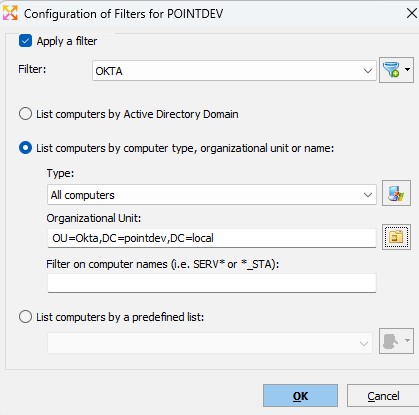
In IDEAL Administration (and IDEAL Remote), you can list the computers in an organizational unit. To do this, go to the domain in question (default tab: My Domain), then click "Filter," "Configure," "Apply Filter," "Add," enter the filter name, and then "Add." Then select the option "List by computer type, organizational unit, or name" In the Organizational Unit section, select the desired organizational unit by clicking the icon and finally "OK".
Once the filter is applied, only the computers in the domain are listed. The selected filter is saved for the tab in question and will be automatically applied the next time the application is launched. |
| Letzte Änderung: 26/03/2025 |
Möchten Sie es selbst überprüfen? Testen Sie IDEAL ADMINISTRATION 30 Tage lang kostenlos.
Unverbindlich • Ohne Agent • Support inklusive • In 5 Minuten einsatzbereit


IDEAL ADMINISTRATION 26.8
30-TAGE-TESTVERSION HERUNTERLADE
SOFTWARE
DIENSTLEISTUNGEN
SITEMAP
POINTDEV
ESPACE REVA2 ALLEE JOSIME MARTIN
13160 CHATEAURENARD
FRANCE


